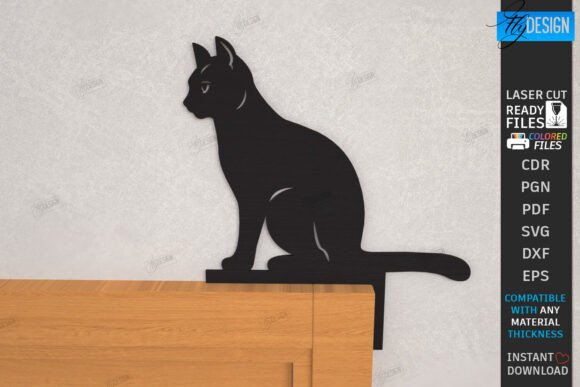
Cat Door Corner Laser Cut Wall Decor
Imagine adding a touch of whimsical charm to your home or office with a single, elegant accent piece. This Cat Door Corner Laser Cut | Wall Decor design offers a unique way to celebrate your love for felines while creating a striking visual statement. Perfect for laser cutting enthusiasts and crafters, this digital asset is designed to bring a playful yet sophisticated element to any space.
This versatile digital file is a fantastic resource for anyone with a laser cutting machine. It’s engineered for precision, with clear color-coded lines: RED lines indicate where to CUT, and BLACK lines are for ENGRAVING. This thoughtful design ensures your finished piece has beautiful depth and detail, whether you're creating a door topper, a wall sign, or a decorative corner accent. Just be sure your cutting machine and software are compatible with the provided file formats.
A Design Asset for Creative Projects
Think of this file not just as a template, but as a premium design asset. Its clean lines and charming subject matter make it adaptable for various creative applications. You could use it to craft a personalized gift for a cat lover, add a custom touch to a pet shop's signage, or even create a series of coordinated home decorations. The black cat silhouette is a classic motif that works well with modern, rustic, or eclectic decor styles.
Practical Use Cases
- Home & Office Decor: Create a unique wall sign for a home office, a playful door sign for a cat's room, or a subtle door topper for a pantry.
- Custom Gifts: Laser-cut this design from wood or acrylic to make a personalized housewarming gift or a special present for a friend.
- Small Business Merchandise: If you sell handmade goods, this design can be incorporated into a product line of pet-themed decor or custom signs.
- Craft Projects: The included files are perfect for projects beyond the laser cutter. Use the SVG or DXF with a vinyl cutter to make decals, or use the PNG for digital mockups and social media graphics.
Choosing the Right File for Your Software
The digital download includes a comprehensive zip archive with SVG, EPS, PNG, PDF, and DXF files, offering maximum flexibility. A key tip for a smooth workflow: if you are using Lightburn software, it is highly recommended to use the DXF file format. Lightburn can sometimes distort SVG dimensions, and the DXF file will provide more reliable and accurate results for your project.
Before you begin, always do a test cut on scrap material to perfect your settings. Consider the material you're using—wood, acrylic, or cardboard will each yield a different aesthetic. The engraving lines will add beautiful texture, so think about how that detail will interact with your chosen material's grain or color.
Why a Well-Designed Template Matters
Using a carefully crafted digital template like this one saves you time and ensures a professional outcome. The design is optimized for cutting and engraving, taking the guesswork out of file preparation. This allows you to focus on the creative aspects: choosing finishes, painting, or assembling your final piece. A polished result, whether it's a door sign for your office or a wall decor piece for your living room, elevates the entire project from a simple craft to a custom-designed item.
This Cat Door Corner Laser Cut file is more than just a pattern; it's a starting point for your creativity. It provides a solid foundation for a project that is both fun to make and delightful to display. If you have any questions about the files or need a different format, feel free to reach out. Thank you for visiting, and consider following the shop to see future creative releases.